IPTV Encoder Box Guide
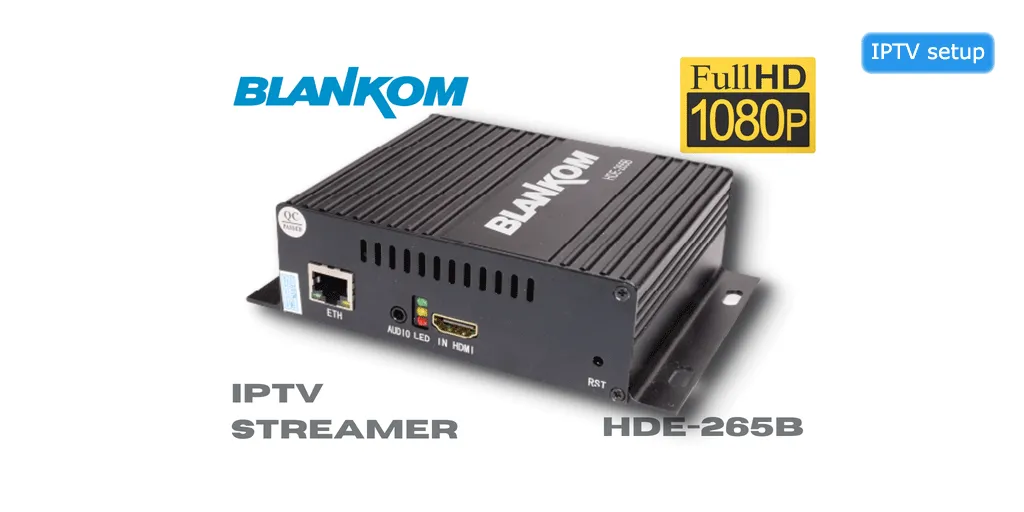
What is an IPTV Encoder Box?
An IPTV encoder box is a device that converts video signals (HDMI, SDI, or analog) into IP streams that can be distributed over a network. These devices are essential for broadcasting live content, creating your own IPTV channels, or streaming video from cameras and other sources to multiple viewers simultaneously.
How IPTV Encoder Boxes Work
Input Source
Connect video source (camera, computer, satellite receiver) via HDMI, SDI, or composite
Encoding Process
Encoder converts video signal to digital format (H.264, H.265/HEVC)
Streaming Protocol
Encoded stream is packaged using protocols (RTMP, HLS, UDP, RTP)
Network Distribution
Stream is sent over IP network to viewers or streaming servers
Playback
Viewers watch the stream on IPTV players, websites, or apps
Top 10 IPTV Encoder Boxes
Teradek VidiU Go
Best Professional Encoder
Specifications:
- Input: HDMI, SDI
- Encoding: H.264 up to 1080p60
- Streaming: RTMP, RTMPS, RTSP
- Connectivity: Ethernet, WiFi, 4G LTE, USB
- Bonding: 4G + WiFi + Ethernet
- Battery: Built-in rechargeable
- Cloud management included
Pros:
- Professional quality
- Multiple connectivity options
- Reliable bonding technology
- Excellent support
Cons:
- Expensive
- Requires subscription for some features
Makito X4 Video Encoder
Best for Broadcast Quality
Specifications:
- Input: 4x SDI, 4x HDMI
- Encoding: H.264/H.265 up to 4K
- Streaming: UDP, RTP, RTSP, HLS
- Latency: Ultra-low (sub-second)
- Dual power supply
- Rack mountable
Pros:
- Broadcast-grade quality
- Multiple inputs
- 4K support
- Very reliable
Cons:
- Very expensive
- Complex setup
Magewell Ultra Encode HDMI
Best Value Professional Encoder
Specifications:
- Input: HDMI
- Encoding: H.264 up to 1080p60
- Streaming: RTMP, RTSP, UDP, HLS
- Audio: Embedded, analog, SDI
- Web interface for configuration
- Compact design
Pros:
- Excellent price/performance
- Easy to configure
- Reliable encoding
- Good support
Cons:
- Single input only
- No 4K support
Kiloview E2 HDMI Encoder
Best Budget Option
Specifications:
- Input: HDMI
- Encoding: H.264/H.265 up to 1080p60
- Streaming: RTMP, RTSP, UDP, SRT
- Low latency mode
- PoE support
- Compact size
Pros:
- Very affordable
- H.265 support
- SRT protocol
- Easy setup
Cons:
- Basic features
- Limited support
Epiphan Pearl-2
Best All-in-One Solution
Specifications:
- Input: 6x HDMI, 2x SDI
- Encoding: H.264 up to 4K
- Streaming: Multiple simultaneous streams
- Recording: Built-in storage
- Switching: Live production features
- Touch screen interface
Pros:
- All-in-one solution
- Multiple inputs
- Built-in switcher
- Recording capability
Cons:
- Very expensive
- Overkill for simple streaming
IPTV Encoder Box Use Cases
1. Live Event Broadcasting
Stream conferences, concerts, sports events, and weddings to remote viewers.
- Connect camera to encoder
- Stream to YouTube, Facebook, or custom IPTV server
- Reach unlimited viewers simultaneously
2. Security & Surveillance
Distribute security camera feeds across IP network for monitoring.
- Encode analog or HD-SDI cameras
- Stream to multiple monitoring stations
- Record and archive footage
3. Corporate Communications
Broadcast company meetings, training sessions, and announcements.
- Stream CEO addresses company-wide
- Deliver training to multiple locations
- Enable two-way communication
4. Education & E-Learning
Stream lectures and classes to remote students.
- Broadcast classroom content
- Enable distance learning
- Record for on-demand viewing
5. House of Worship
Stream religious services to congregation members at home.
- Broadcast services live
- Reach homebound members
- Archive sermons for later viewing
6. Digital Signage
Distribute content to multiple displays across facilities.
- Stream to digital signs
- Update content centrally
- Manage multiple locations
Key Features to Consider
1. Input Options
- HDMI: Most common, supports up to 4K
- SDI: Professional broadcast standard
- Composite/Component: Legacy analog sources
- USB: Webcams and USB cameras
2. Encoding Standards
- H.264 (AVC): Universal compatibility
- H.265 (HEVC): Better compression, 4K support
- VP9: Open standard, YouTube preferred
- AV1: Next-gen codec, emerging support
3. Streaming Protocols
- RTMP: Standard for live streaming platforms
- HLS: Apple standard, adaptive bitrate
- RTSP: Real-time streaming, low latency
- SRT: Secure reliable transport
- UDP/RTP: Broadcast applications
4. Resolution & Frame Rate
- 720p @ 30/60fps - Basic HD
- 1080p @ 30/60fps - Full HD standard
- 4K @ 30/60fps - Ultra HD (premium encoders)
5. Latency
- Ultra-low: Less than 1 second (interactive applications)
- Low: 2-5 seconds (live events)
- Standard: 10-30 seconds (general streaming)
6. Network Connectivity
- Gigabit Ethernet (required for HD/4K)
- WiFi (backup or mobile use)
- 4G/5G LTE (mobile broadcasting)
- Bonding (combine multiple connections)
Setting Up an IPTV Encoder Box
Basic Setup Process:
Step 1: Physical Connections
- Connect video source to encoder input (HDMI/SDI)
- Connect encoder to network via Ethernet
- Connect power supply
- Power on the device
Step 2: Network Configuration
- Access encoder web interface (check manual for IP)
- Configure network settings (DHCP or static IP)
- Set up port forwarding if needed
- Test network connectivity
Step 3: Encoding Settings
- Select video codec (H.264 or H.265)
- Set resolution and frame rate
- Configure bitrate (3-10 Mbps for HD)
- Adjust audio settings
Step 4: Streaming Configuration
- Choose streaming protocol (RTMP, HLS, etc.)
- Enter streaming server URL
- Add stream key if required
- Configure backup streams if available
Step 5: Testing
- Start the stream
- Verify video and audio quality
- Check latency
- Monitor bandwidth usage
- Test on multiple devices
IPTV Encoder vs Software Encoder
Hardware Encoder (Encoder Box)
Advantages:
- ✓ Dedicated hardware, reliable
- ✓ Low latency
- ✓ Doesn't use computer resources
- ✓ Professional quality
- ✓ Portable and standalone
Disadvantages:
- ✗ Higher upfront cost
- ✗ Less flexible
- ✗ Requires physical device
Software Encoder (OBS, vMix)
Advantages:
- ✓ Free or low cost
- ✓ Very flexible
- ✓ Easy to update
- ✓ Advanced features
- ✓ No additional hardware
Disadvantages:
- ✗ Uses computer resources
- ✗ Can be unstable
- ✗ Higher latency
- ✗ Requires powerful PC
Troubleshooting Common Issues
No Video Output
Solutions:
- Check input cable connections
- Verify source device is powered on
- Check input resolution compatibility
- Try different input port
- Restart encoder
Stream Buffering/Stuttering
Solutions:
- Reduce bitrate settings
- Check network bandwidth
- Use wired connection instead of WiFi
- Lower resolution or frame rate
- Check server capacity
High Latency
Solutions:
- Enable low-latency mode
- Use RTSP instead of HLS
- Reduce keyframe interval
- Optimize network path
- Use dedicated streaming server
Audio Sync Issues
Solutions:
- Adjust audio delay in settings
- Check audio input source
- Verify audio codec settings
- Update encoder firmware
Frequently Asked Questions
Do I need an encoder box or can I use software?
For professional, reliable streaming, a hardware encoder is recommended. Software encoders work for casual streaming but may be less stable and use significant computer resources.
What bitrate should I use?
For 1080p: 4-6 Mbps, For 720p: 2-4 Mbps, For 4K: 15-25 Mbps. Higher bitrates provide better quality but require more bandwidth.
Can I stream to multiple platforms simultaneously?
Yes, many encoder boxes support multi-streaming to YouTube, Facebook, and custom RTMP servers at the same time.
What's the difference between H.264 and H.265?
H.265 (HEVC) offers better compression (50% smaller files) and 4K support, but H.264 has wider compatibility with older devices and players.
How much bandwidth do I need?
Upload bandwidth should be 1.5x your streaming bitrate. For 5 Mbps stream, you need at least 7.5 Mbps upload speed.
Related Articles
IPTV encoder guide | IPTV setup | IPTV channels | IPTV providers